Overview
Gratis Reviews manages customer testimonials and star ratings, and outputs Schema.org Review structured data so ratings can be eligible to appear in search results. Testimonials are stored as their own content type and displayed with shortcodes — either as a grid of quotes or as a single inline star rating.
Managing testimonials
- Open Testimonials in the admin sidebar and click Add Testimonial.
- Write the quote in the editor, then complete the Testimonial Details meta box.
- Rating — a 1–5 star score for this testimonial.
- Author name — the person quoted; falls back to the post title if left blank.
- Author role / company — an optional line shown under the name, for example
CEO, Acme.
Opening the settings screen
- Go to Testimonials → Settings (URL:
/wp-admin/edit.php?post_type=gratis_testimonial&page=gratis-reviews-settings). - Adjust the defaults, then click Save settings.
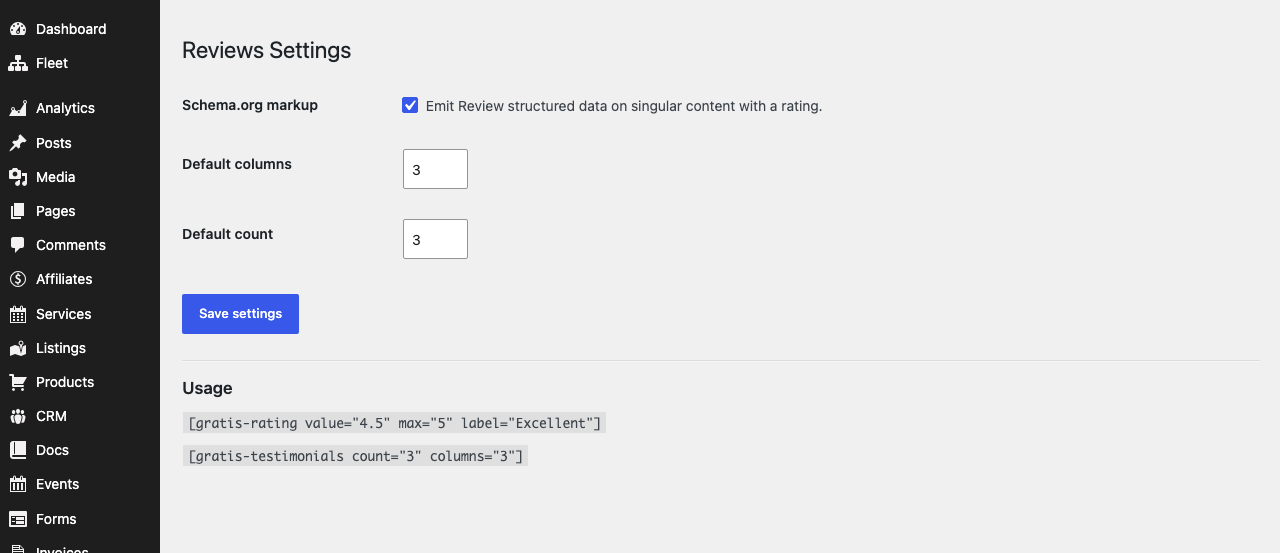
Display settings
- Schema.org markup — when enabled, Review structured data is emitted on singular content that carries a rating, helping search engines understand the score. Leave it on unless another plugin already outputs review schema, to avoid duplicate markup.
- Default columns — how many columns the testimonial grid uses when a shortcode does not specify one. Accepts 1–6 (default 3).
- Default count — how many testimonials the grid shows by default. Accepts 1–50 (default 3).
Shortcodes
- Star rating —
valueis the score,maxthe maximum (default 5) andlabelan optional caption beside the stars. - Testimonial grid —
Finally, analytics without cookies or GDPR headaches. Simple dashboard, accurate enough, completely self-hosted.
Privacy First Analytics ★★★★★Gratis Cache with Redis gave us sub-100ms TTFB. The request tracer helped us identify bottlenecks we never knew existed.
Best Cache Plugin ★★★★★The Gratis suite replaced 6 premium plugins for us. Performance improved and we save over 400 dollars per year.
Amazing Suite countandcolumnsoverride the defaults above for that placement.
Recommended starting point
- Add a handful of testimonials, each with a Rating, Author name and role.
- Leave Schema.org markup enabled unless another SEO or review plugin already adds it.
- Place
Finally, analytics without cookies or GDPR headaches. Simple dashboard, accurate enough, completely self-hosted.
Privacy First Analytics ★★★★★Gratis Cache with Redis gave us sub-100ms TTFB. The request tracer helped us identify bottlenecks we never knew existed.
Best Cache Plugin ★★★★★The Gratis suite replaced 6 premium plugins for us. Performance improved and we save over 400 dollars per year.
Amazing Suite