Overview
Gratis Invoice creates and tracks invoices inside WordPress. Each invoice records the client, a list of line items, a status and a due date, and can be opened as a clean, printable page that is ready to save as a PDF from your browser. The settings screen holds the company-wide defaults that new invoices inherit.
Managing invoices
Invoices are a custom post type. Open Invoices → Add New and complete the Invoice Details box:
- Client name and Client email — who the invoice is addressed to.
- Status — the invoice’s state:
draft,sent,paidoroverdue. - Due date — when payment is expected.
- Currency — a 3-letter code (for example
USDorEUR) for this invoice; it defaults to your global currency. - Line items (JSON) — the billable lines, entered as an array of
{"desc":"...","qty":1,"price":0}objects. The invoice total is recalculated automatically every time you save.
Opening the settings screen
- In the WordPress admin sidebar, open Invoices.
- Click Settings (URL:
/wp-admin/edit.php?post_type=gratis_invoice&page=gratis-invoice-settings). - Set the defaults below, then click Save settings.
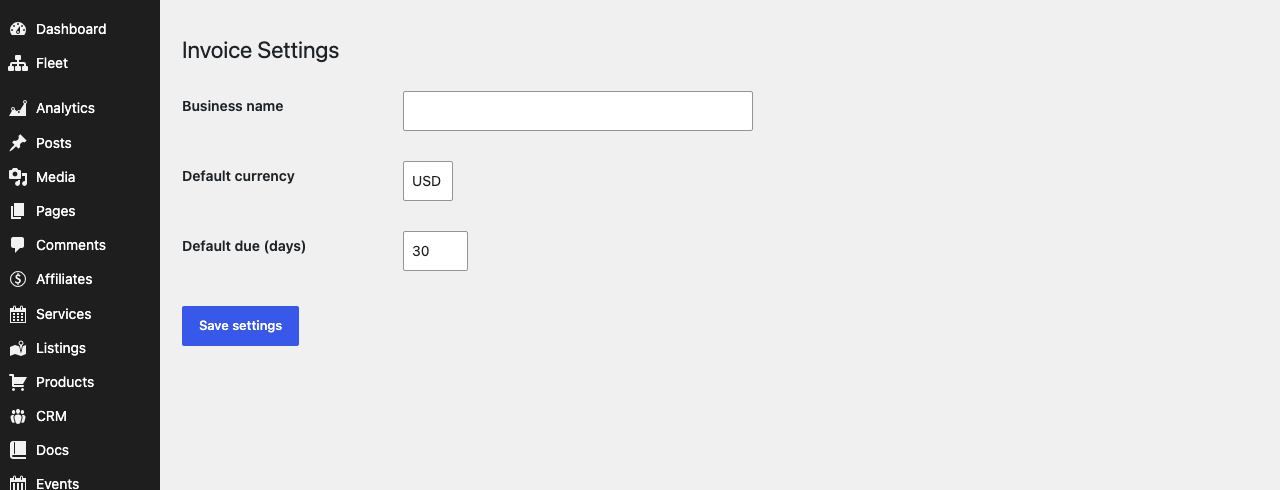
Company details and defaults
- Business name — your company name, printed at the top of every invoice. Leave blank to omit it.
- Default currency — the 3-letter currency code applied to new invoices (default
USD). Individual invoices can override it. - Default due (days) — how many days after creation a new invoice is due (default
30), used to pre-fill the due date.
Printing an invoice
Once an invoice is published, an Open printable invoice button appears in the Invoice Details box. It opens a self-contained, print-styled page — with your business name, the client, the line items and the total — in a new tab and triggers the browser’s print dialog. From there you can print it or save it as a PDF.
Recommended starting point
- Enter your Business name and confirm the Default currency and Default due (days).
- Create an invoice under Invoices → Add New and add line items as
{"desc","qty","price"}objects. - Set the status to sent when you issue it, and paid once it is settled.
- Use Open printable invoice to generate a PDF for the client.