Overview
Gratis Comply handles core GDPR/CCPA tasks: a configurable cookie consent banner shown in the site footer, a one-click privacy-policy page generator, a running consent log, and REST endpoints for visitor data export and erasure requests. It works immediately after activation with privacy-friendly defaults that store a salted visitor hash rather than raw IP addresses.
Opening the settings screen
- In the WordPress admin sidebar, hover Settings.
- Click Gratis Comply (URL:
/wp-admin/options-general.php?page=gratis-comply). - Adjust the cookie-banner options, then click Save settings.
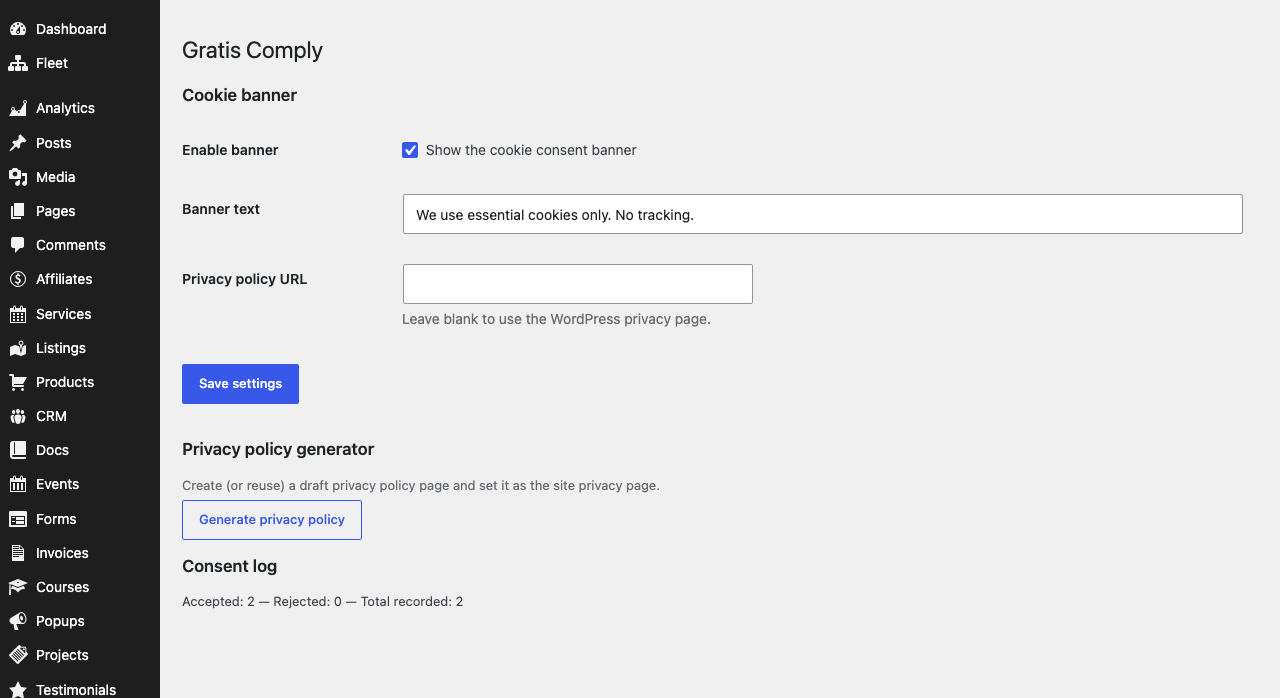
Cookie banner
- Enable banner — shows or hides the cookie consent banner on the front end. On by default. The banner only appears until the visitor makes a choice, which is stored client-side so cached pages stay fast.
- Banner text — the message shown in the banner. Default:
We use essential cookies only. No tracking. - Privacy policy URL — the address the banner’s “Privacy Policy” link points to. Leave blank to fall back to the WordPress privacy page.
Privacy policy generator
The Generate privacy policy button creates (or reuses) a draft Privacy Policy page populated with boilerplate text naming your site, and sets it as the official WordPress privacy page. Because it is saved as a draft, you can review and edit the wording before publishing. If a privacy page already exists, the plugin reuses it instead of creating a duplicate.
Consent log
Every accept/reject choice is recorded to an audit trail and summarised on the settings screen as Accepted, Rejected, and Total recorded counts. Each entry stores only a daily-rotating salted hash of the visitor plus a timestamp — never the raw IP — and the log is automatically capped so it cannot grow without bound.
Data export and erasure requests
Two public REST endpoints let your front end collect privacy choices and requests:
- Consent collector — the banner POSTs each choice to
/wp-json/gratis-comply/v1/consentto build the log. - Data request —
POST /wp-json/gratis-comply/v1/data-requestwith anemailand atypeofexportordeletecreates a native WordPress personal-data export or erasure request, which you then confirm under Tools → Export/Erase Personal Data.
Recommended starting point
- Leave Enable banner on and tailor the Banner text to your cookie usage.
- Click Generate privacy policy, then edit and publish the draft page.
- Leave Privacy policy URL blank so the banner links to that generated page automatically.
- Check the Consent log totals periodically to confirm the banner is being recorded.