Overview
Gratis Notify adds self-hosted browser push notifications so you can re-engage visitors when you publish a new post, without paying for a service like OneSignal or PushEngage. It shows an opt-in prompt to visitors, stores their subscription on your own site, and records each newly published post as a notification that subscribed browsers pick up through a lightweight polling beacon — no third-party push gateway required.
Opening the settings screen
- In the WordPress admin sidebar, hover Settings and click Gratis Notify (URL:
/wp-admin/options-general.php?page=gratis-notify). - Adjust the options below, then click Save settings.
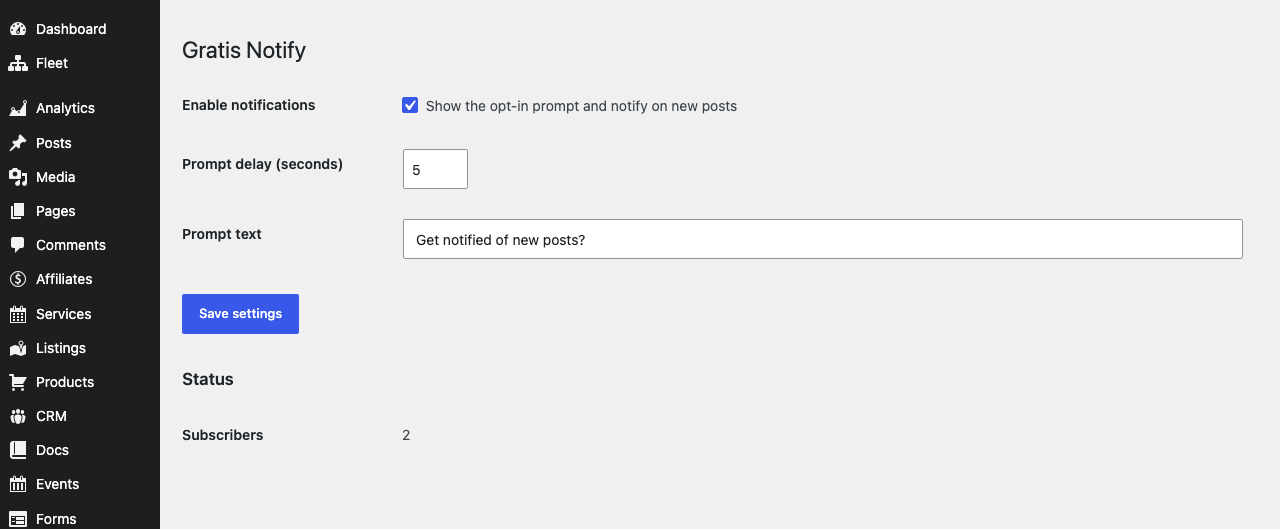
Notification settings
- Enable notifications — the master switch. When on, the opt-in prompt is shown to visitors and new posts are recorded as notifications. Turn it off to suspend all prompts and publish notices without deactivating the plugin.
- Prompt delay (seconds) — how long to wait after a page loads before the opt-in prompt appears. Accepts 1–120 seconds (default 5); a short delay avoids interrupting visitors the instant they arrive.
- Prompt text — the message shown inside the opt-in prompt (default
Get notified of new posts?). Use it to tell visitors what they are subscribing to.
Status panel
Below the form, the screen reports current activity so you can confirm the system is working:
- Subscribers — the number of browsers that have accepted the prompt and registered an endpoint.
- Latest notification — the title of the most recently published post that was recorded for delivery.
How delivery works
- When a visitor accepts the prompt, their browser posts its subscription to the
gratis-notify/v1/subscribeREST route, which stores the endpoint on your site. - Publishing a standard
postrecords its title, an excerpt and its link. Subscribed browsers read the newest entry from thegratis-notify/v1/latestroute, so delivery works as a polling fallback without an external push service.
Recommended starting point
- Leave Enable notifications on and write a clear Prompt text that names your site or topic.
- Set Prompt delay to roughly 5–10 seconds so the prompt appears after visitors start reading.
- Publish a test post and confirm the Subscribers count and Latest notification values update on this screen.