Overview
Gratis CRM is lightweight contact management built on a custom post type. Each contact stores a name, email, phone, company, and notes; contacts can be tagged, searched, sorted, exported to CSV, and captured automatically from new user registrations and Gratis Forms submissions. There is no separate settings screen — everything happens on the contact list and edit screens under the CRM menu.
Managing contacts
- In the WordPress admin sidebar, open the CRM menu (the
gratis_contactpost type, shown with a people icon). - Click Add Contact to create one, or click an existing row to edit it.
- Fill in the Contact Details box and click Publish / Update. The contact’s title is kept in sync with the name (or email) automatically.
Contact details fields
The Contact Details meta box on the edit screen holds the core record:
- Name — the contact’s full name; also used as the post title.
- Email — the contact’s email address. It is the key used to de-duplicate contacts, so the same address is never stored twice.
- Phone — a telephone number.
- Company — the organisation the contact belongs to.
- Notes — a free-text area for context about the contact.
- Source — a read-only label shown when the contact was captured automatically (for example
registrationorform), so you can see where a lead came from.
Tags and the contacts list
- Tags — contacts use a
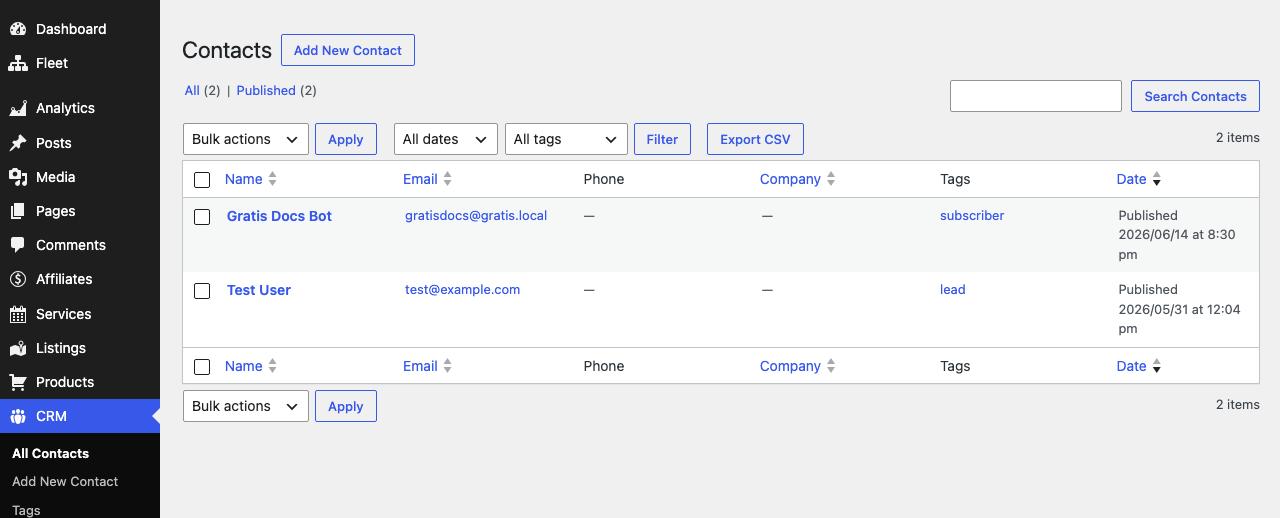
contact_tagtaxonomy you can manage from the CRM submenu and assign per contact; a tag column and a tag filter dropdown appear above the list. - Custom columns — the list table shows Name, Email, Phone, and Company at a glance, with the email rendered as a clickable
mailto:link. - Sorting — the Email and Company columns are sortable.
- Search — the admin search box matches name, email, phone, and company values, not just the title.
Automatic lead capture
- New user registrations — when someone registers, a contact is created from their email and display name, tagged
subscriber, with the source set toregistration. - Gratis Forms submissions — when a Gratis form is submitted, the plugin reads the email, name, phone, and company fields, creates (or updates) the matching contact tagged
lead, and records the originating form. This requires the gratis-forms plugin.
Exporting to CSV
An Export CSV button sits above the contacts list. It downloads every contact (or only those matching the active tag filter) as a spreadsheet with the columns ID, Name, Email, Phone, Company, Tags, Source, Notes, Created. Use the tag dropdown first to export a focused segment.
Tips
- Always set the Email field — it powers de-duplication and the CSV export.
- Use Tags to separate
subscriberandleadsegments, then filter the list before exporting. - Install gratis-forms to capture leads automatically from your site’s contact forms.