Overview
Gratis CDN rewrites your static asset and upload URLs to a content-delivery domain, adds content-hash cache busting so updated files are picked up immediately, and gives you a one-click purge plus a REST purge API for Cloudflare, BunnyCDN, KeyCDN, or a generic webhook. It is configured from one screen and stays inactive until you enter a CDN URL.
Opening the settings screen
- In the WordPress admin sidebar, hover Settings.
- Click Gratis CDN (URL:
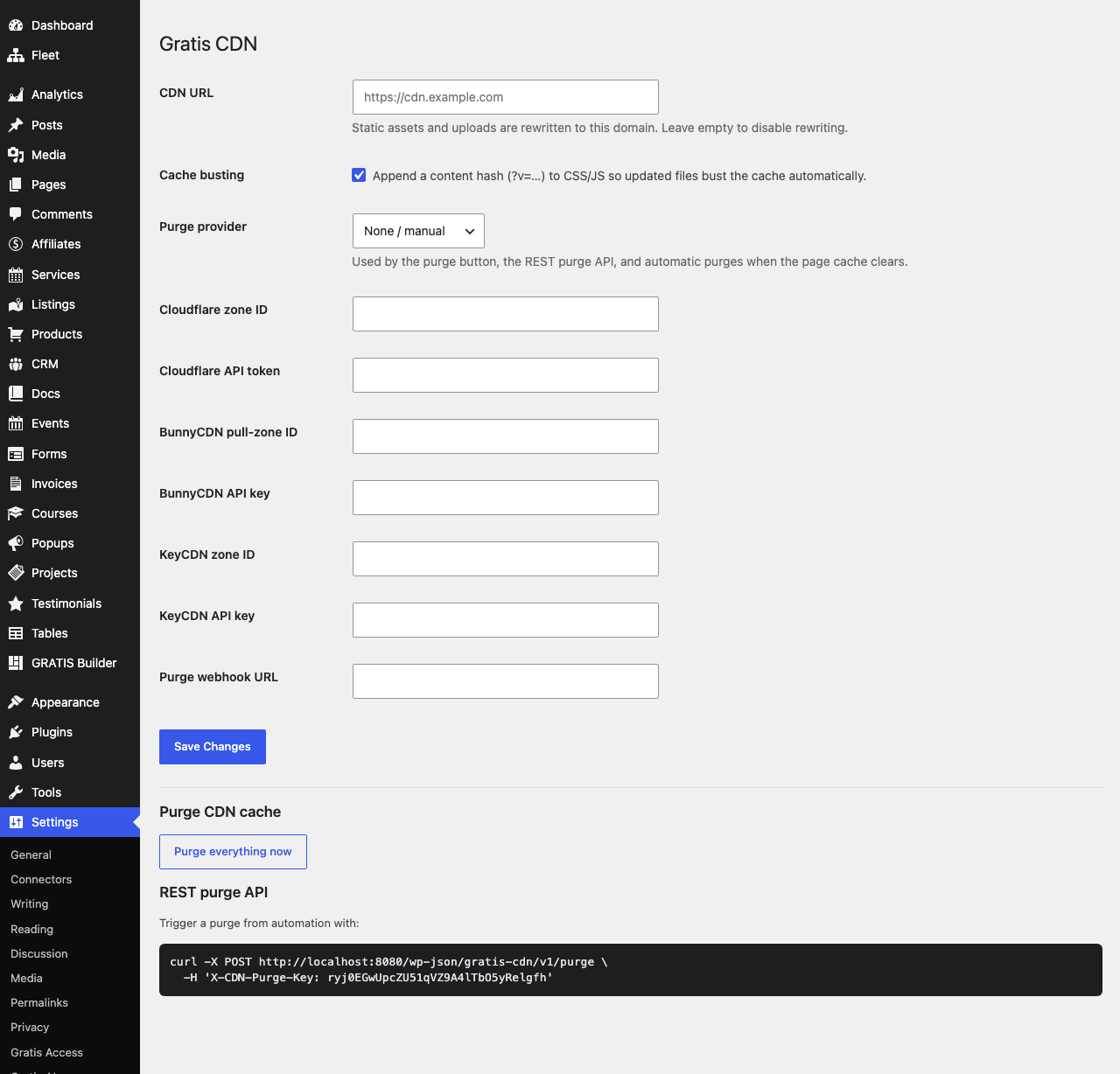
/wp-admin/options-general.php?page=gratis-cdn). - Fill in the fields below, then click Save Changes.
Asset rewriting
- CDN URL — the domain that CSS, JS, and uploaded media are rewritten to, e.g.
https://cdn.example.com. The plugin also addspreconnectanddns-prefetchhints for this host. Leave it empty to disable rewriting entirely. - Cache busting — when enabled, appends a short content hash (
?v=…) to CSS and JS URLs so a changed file automatically defeats the cache instead of serving a stale copy. On by default.
Purge provider and credentials
Choose a Purge provider — None / manual, Cloudflare, BunnyCDN, KeyCDN, or Generic webhook. The selected provider is used by the purge button, the REST purge API, and automatic purges that fire when the page cache clears. Then fill in only the credentials for your provider:
- Cloudflare zone ID and Cloudflare API token — identify the zone and authenticate the purge. The token is stored masked and shown as
********; leave the mask untouched to keep the saved value. - BunnyCDN pull-zone ID and BunnyCDN API key — the pull zone to clear and its API key (key is masked).
- KeyCDN zone ID and KeyCDN API key — the KeyCDN zone and its API key (key is masked).
- Purge webhook URL — for the generic webhook provider, the endpoint the plugin POSTs to when a purge is requested.
Manual purge and REST API
- Purge everything now — a button that immediately clears the configured CDN’s cache.
- REST purge API — trigger a purge from automation by POSTing to
/wp-json/gratis-cdn/v1/purgewith the headerX-CDN-Purge-Key. The key is generated automatically and displayed on the settings page next to a ready-to-copycurlexample.
Recommended starting point
- Enter your CDN URL and leave Cache busting enabled.
- Select your Purge provider and enter only that provider’s credentials.
- Click Purge everything now once to confirm the credentials work (a success or error notice is shown).
- Use the REST purge API key in your deploy pipeline so releases clear the CDN automatically.