Overview
Gratis Forms is a form builder. You create forms in the admin, lay out their fields, and embed them on any page with a shortcode. Submissions are stored in the database and listed in the admin, and every form is protected by a built-in honeypot, with optional reCAPTCHA v3 scoring on top.
Managing forms
Forms are a custom post type. Open Forms → Add New, give the form a title, then build it in the fields meta box. Each field has a type, a label, an optional placeholder and a required toggle. Supported field types are text, email, textarea, select, checkbox, radio and file. Per form you can also set:
- Notification recipient — the email address that is notified when the form is submitted.
- reCAPTCHA — a per-form switch to apply reCAPTCHA v3; it only takes effect when the global keys below are configured.
Opening the settings screen
- In the WordPress admin sidebar, open Forms.
- Click Settings (URL:
/wp-admin/edit.php?post_type=gratis_form&page=gratis-forms-settings). - Fill in the fields below, then click Save Changes.
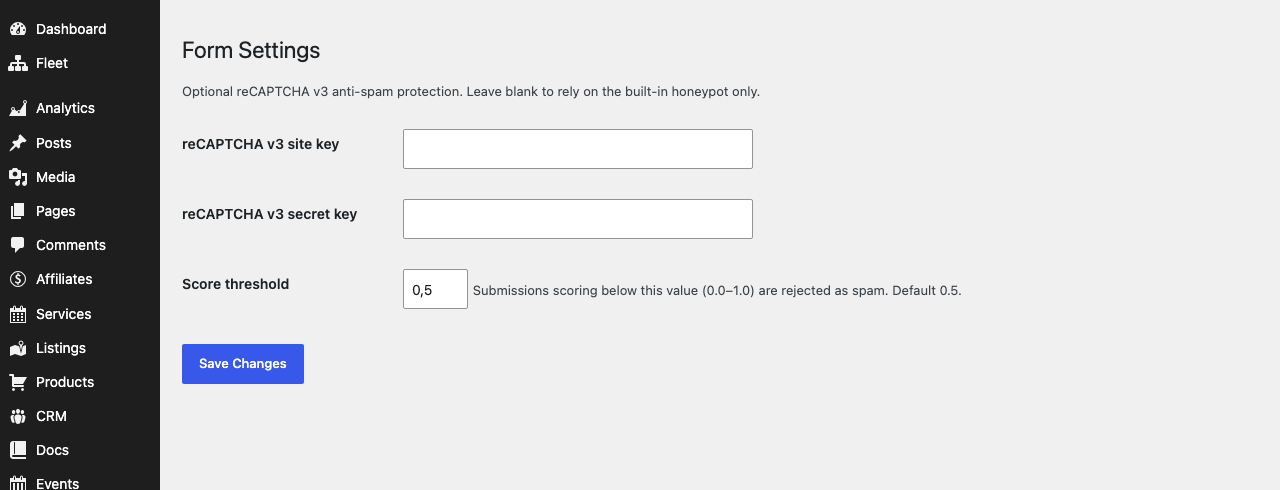
Anti-spam (reCAPTCHA v3)
reCAPTCHA is optional — leave these blank to rely on the built-in honeypot alone.
- reCAPTCHA v3 site key — the public key from Google reCAPTCHA, loaded on the front end to score visitors.
- reCAPTCHA v3 secret key — the private key used server-side to verify each submission. Both keys must be present for reCAPTCHA to activate.
- Score threshold — a value from
0.0to1.0(default0.5). Submissions scoring below it are rejected as spam. Raise it to be stricter, lower it if genuine users are being blocked.
Viewing submissions
Saved entries appear under Forms → Submissions, where you can review what visitors sent through each form. The submissions table is created when the plugin is activated.
Shortcodes
- Embed a form — place a published form on any page or post with
, where123is the form’s ID (shown in the Forms list).works as an alias.
Recommended starting point
- Build a form under Forms → Add New and set its notification recipient.
- Embed it on a page with
. - For high-spam forms, add reCAPTCHA v3 keys and enable reCAPTCHA on the form; start with the default 0.5 threshold.
- Check Forms → Submissions to confirm entries are arriving.