Overview
Gratis Community adds lightweight social features to WordPress: an activity feed, member profiles with bio and avatar, public groups, and private messaging, all backed by native post types and a small REST API. It is configured from a single settings screen and exposes shortcodes so you can drop profiles and the activity feed into any page.
Opening the settings screen
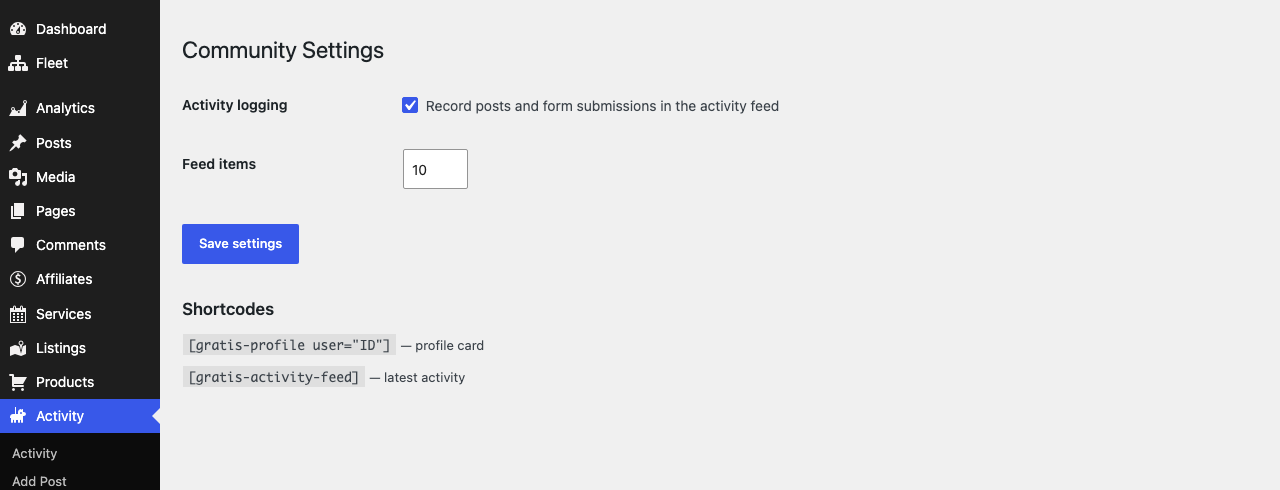
- In the WordPress admin sidebar, open the Activity menu.
- Click Settings (URL:
/wp-admin/edit.php?post_type=gratis_activity&page=gratis-community-settings). - Adjust the options below, then click Save settings.
Activity, groups, and messages
The plugin registers three post types:
- Activity (
gratis_activity) — the feed of member actions. Entries are created automatically (see logging below) and listed under the Activity admin menu. - Groups (
gratis_group) — public groups with a title, description, and image, published with their own archive at/groups/. - Messages (
gratis_message) — private member-to-member messages stored behind the scenes (no admin list) and created through the REST API.
Settings
- Activity logging — when enabled, records published posts and Gratis form submissions in the activity feed. Disable it if you want the feed populated only by your own code. On by default.
- Feed items — how many entries the
No activity yet.
10.
Member profile fields
A Community Profile section is added to each user’s WordPress profile screen (Users → your account). Users (or admins) can edit:
- Bio — a short biography shown on the profile card.
- Avatar URL — a custom avatar image address.
- Social URL — a link to the member’s social profile or website.
Shortcodes
- Profile card — renders a member’s name, bio, and join date. Pass a user ID, or omit it to show the current user.
User not found.
- Activity feed — lists the most recent activity, limited by the Feed items setting.
No activity yet.
Recommended starting point
- Leave Activity logging on so the feed fills automatically as members post and submit forms.
- Set Feed items to a comfortable length for your layout (10 is a good default).
- Add
No activity yet.
User not found.
- Ask members to complete their Bio and Avatar URL for richer profile cards.