Overview
Gratis Affiliate runs a referral program inside WordPress. Each affiliate gets a unique referral code; when a visitor arrives with that code in the URL the plugin drops a tracking cookie, and when they later complete an order a pending commission is recorded against the affiliate. Affiliates and their referrals are stored as custom post types, and a single settings screen controls the commission rate, cookie lifetime, and payout threshold.
Managing affiliates and referrals
The plugin registers two custom post types, both reachable from the Affiliates menu:
- Affiliates (
gratis_affiliate) — one record per affiliate, holding their linked user, referral code (_ref_code), commission rate, total earned, and status. - Referrals (
gratis_referral) — one record per tracked conversion, with the commission amount and apendingorpaidstatus. These appear as a submenu under Affiliates.
An affiliate’s referral link is simply any page URL with ?ref=THEIR-CODE appended. When that link is visited, a cookie is stored for the configured number of days and credited on the next completed order.
Opening the settings screen
- In the WordPress admin sidebar, open Affiliates.
- Click Settings (URL:
/wp-admin/edit.php?post_type=gratis_affiliate&page=gratis-affiliate-settings). - Adjust the fields below, then click Save settings.
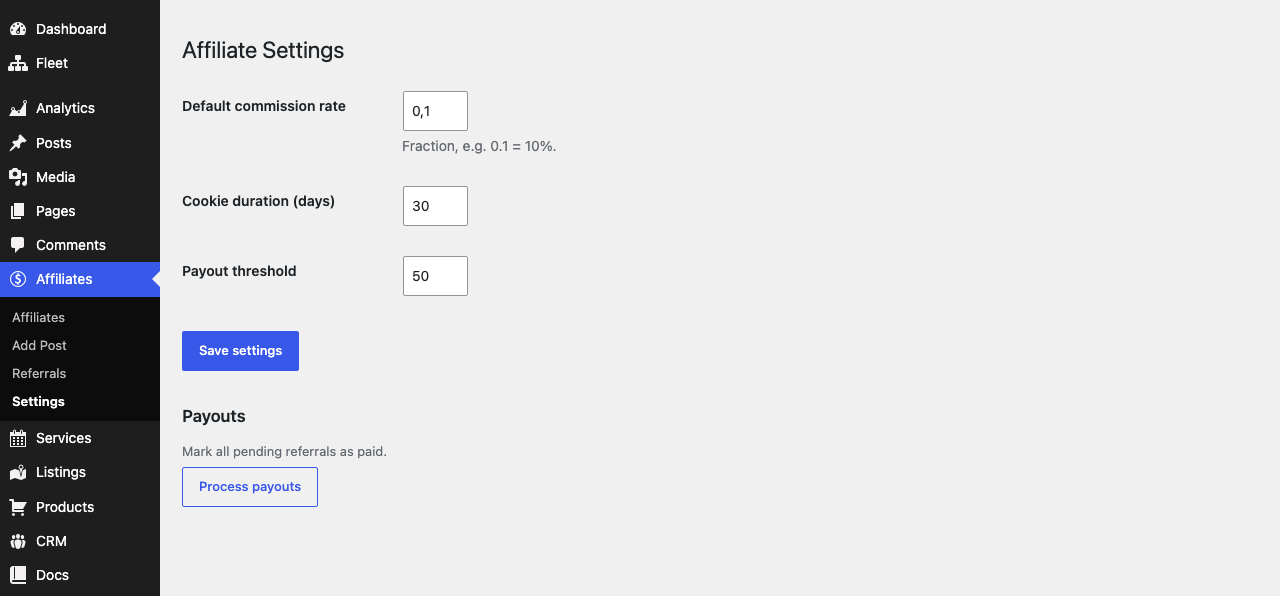
Commission and tracking settings
- Default commission rate — the share of an order paid to the referring affiliate, entered as a fraction:
0.1means 10%. It is used whenever an affiliate has no individual rate set, and is clamped to the range 0–1. - Cookie duration (days) — how long a referral is remembered after the visitor clicks an affiliate link. A larger window credits affiliates for slower purchase decisions; the default is
30days. - Payout threshold — the minimum balance an affiliate must accrue before they are eligible for payout. The default is
50(in your store currency).
Processing payouts
The Payouts section provides a single Process payouts button that marks every pending referral as paid in one batch. Use it after you have actually sent the money (for example via your normal bank or PayPal transfer); the button only updates the referral records’ status so your reporting stays accurate.
How commissions are recorded
Commissions are created automatically on the gratis_commerce_order_completed event, so referral revenue is captured when an order from Gratis Commerce completes. The amount equals the order total multiplied by the affiliate’s rate (or the default rate), and the affiliate’s running _total_earned is updated at the same time. If no referral cookie is present, no commission is recorded.
Recommended starting point
- Set a realistic Default commission rate (for example
0.1for 10%). - Leave Cookie duration at
30days unless your sales cycle is unusually long or short. - Create an affiliate record, share its
?ref=link, and place a test order to confirm a pending referral appears. - Pay affiliates who pass the Payout threshold, then click Process payouts to mark them paid.