Overview
Gratis Cache is a full-stack performance toolkit: it manages object caching (Redis), an object-cache.php drop-in, OPcache and server-level page caches (LiteSpeed, Nginx, Apache), request logging, a hook tracer, and on-the-fly image conversion to WebP/AVIF. Everything is controlled from a single Cache Manager menu, and the plugin auto-detects your server and Cloudflare so most defaults are correct on activation.
Opening the settings screen
- In the WordPress admin sidebar, click the top-level Cache Manager menu (URL:
/wp-admin/admin.php?page=vlt-cache) to reach the Dashboard. - Open the Settings subpage (URL:
/wp-admin/admin.php?page=vlt-cache-settings). - Adjust the options below, then click Save settings. Each option is saved independently.
Note: the Cache Manager interface ships localized and may appear in another language (for example Lithuanian) depending on your site locale, even though the option names described here are in English.
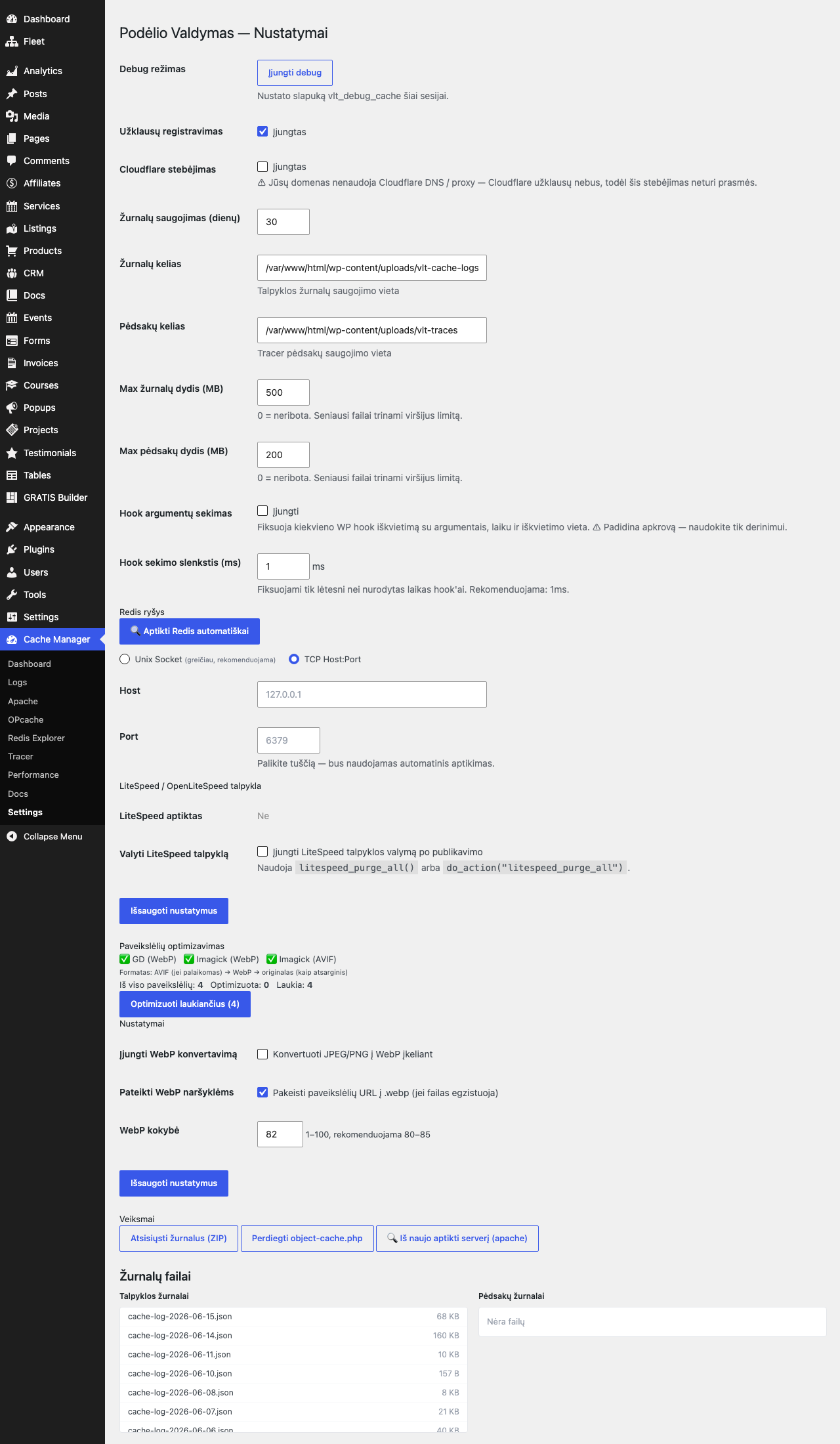
Request logging and storage
- Debug mode — a per-session toggle that sets the
vlt_debug_cachecookie so only your browser sees verbose cache headers and diagnostics. It does not affect other visitors. - Request logging — records each front-end request (cache hit/miss, timing) so you can audit what is being cached. Turn it off on very high-traffic sites to save disk I/O.
- Cloudflare tracking — logs which requests were served via Cloudflare. The plugin checks your DNS and warns you (and defaults this off) when the domain is not behind Cloudflare, since the data would be meaningless.
- Log retention (days) — how many days of request logs to keep before pruning. Default
30(range 1–365). - Log path — filesystem location for cache logs. Default
wp-content/uploads/vlt-cache-logs. - Trace path — where the tracer writes its trace files. Default
wp-content/uploads/vlt-traces. - Max log size (MB) — disk cap for logs; the oldest files are deleted once exceeded. Default
500;0means unlimited. - Max trace size (MB) — the same cap applied to trace files. Default
200;0means unlimited.
Hook tracing
- Hook argument tracing — records every WordPress hook invocation with its arguments, duration, and call location. It is a deep debugging tool that adds measurable overhead, so enable it only while investigating a problem.
- Hook tracing threshold (ms) — only hooks slower than this many milliseconds are recorded, keeping the trace focused on real bottlenecks. Default
1.0ms.
Redis connection
- Auto-detect Redis — a button that probes common sockets/ports and fills in the connection fields for you; recommended before configuring anything by hand.
- Connection mode — choose Unix socket (faster, recommended where available) or TCP host:port.
- Unix socket path — the socket file to connect through, e.g.
/home/user/.redis/redis.sock. Leave blank to use TCP. - Host — Redis hostname for TCP connections, e.g.
127.0.0.1. - Port — Redis TCP port (commonly
6379). Leave blank to let auto-detection decide.
LiteSpeed and image optimization
- Purge LiteSpeed cache after publishing — clears the LiteSpeed/OpenLiteSpeed page cache when content changes, using
litespeed_purge_all(). Shown only when LiteSpeed is detected. - Enable WebP conversion — converts uploaded JPEG/PNG images to WebP automatically. Requires the PHP
gdorimagickextension (the status line reports GD, Imagick, and AVIF availability). - Serve WebP to browsers — rewrites image URLs to the
.webpversion when that file exists. The serving order is AVIF → WebP → original as a fallback. Default on. - WebP quality — compression quality from 1–100 for generated images. Default
82; 80–85 is recommended.
Maintenance actions
- Download logs (ZIP) — exports the cache and trace logs for offline analysis.
- Install / reinstall
object-cache.php— deploys (or refreshes) the drop-in that activates persistent object caching. - Re-detect server — re-runs server detection (LiteSpeed/Nginx/Apache) if your hosting environment changed.
- Admin-bar quick purge — the toolbar shows live hit/miss counts plus one-click purges for All, the server cache, OPcache, and Redis, and a debug toggle.
Recommended starting point
- Click Auto-detect Redis, then Install
object-cache.phpto enable persistent object caching. - Leave Request logging on with the default retention while you tune, then lower it on busy sites.
- Enable WebP conversion and Serve WebP at quality
82if GD or Imagick is available. - Keep Hook argument tracing off except when actively debugging a slow page.